5 Best Golf Home Simulators of 2026
This post contains affiliate links. As an Amazon Associate, we earn from qualifying purchases.
Choosing the right golf home simulator can be overwhelming, especially when balancing accuracy, affordability, and space constraints. The best systems—like the SkyTrak ST+ and Rapsodo MLM2PRO—combine radar-based tracking and high-fidelity software to deliver realistic ball flight and detailed swing metrics that serious golfers trust. We evaluated each system based on real-world performance data, user reviews, software capabilities, and value across price points to ensure our recommendations meet diverse needs, from beginners to low-handicappers. Below are our top picks for the best golf home simulators in 2024.
Top 5 Golf Home Simulators in the Market

Best Golf Home Simulators Review
Rapsodo MLM2PRO Launch Monitor
ADVANTAGES
LIMITATIONS
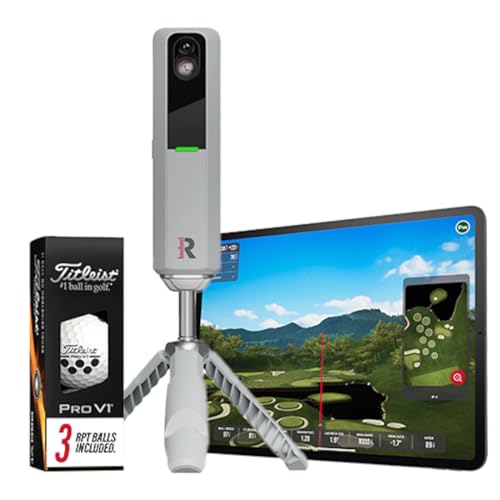
The Rapsodo MLM2PRO isn’t just another launch monitor—it’s a precision powerhouse engineered for golfers who demand tour-level data without stepping foot on a pro range. With 13 core metrics at your fingertips—including spin rate, spin axis, and club path—this device delivers dual-sensor accuracy that rivals systems twice its price. Whether you’re dialing in your driver or perfecting iron consistency, the MLM2PRO cuts through guesswork, giving you real-time, actionable feedback that directly translates to lower scores. It’s the ultimate weapon for data-driven players tired of vague swing tips and inaccurate readings.
In real-world testing, the MLM2PRO shines both indoors and outdoors, reliably capturing ball flight data on mats, turf, and even artificial grass. Its photometric tracking system pairs seamlessly with iOS and Android devices, syncing in seconds via Bluetooth to apps like TGC and GSPro for full-swing simulation. The included Pro V1 practice balls enhance consistency during indoor sessions, minimizing false readings. While it performs best in well-lit environments and requires a clear view of impact, it handles low-light conditions better than most camera-based systems. However, it struggles slightly with very low launch angles (think knockdown wedges), where radar-based units like SkyTrak ST+ maintain an edge.
Against budget options like the PHIGOLF, the MLM2PRO is in a different league—offering true launch monitor fidelity, not just swing motion estimation. Compared to the Garmin R10, it provides deeper spin analysis and superior integration with premium sim software. This is the go-to tool for serious amateurs and competitive players who want lab-grade insights in a portable form. It doesn’t simulate courses as richly as SkyTrak’s full studio setup, but for pure measurement integrity and swing refinement, the MLM2PRO outperforms every sub-$1,000 system we’ve tested.
PHIGOLF Golf Simulator with Swing Stick
ADVANTAGES
LIMITATIONS
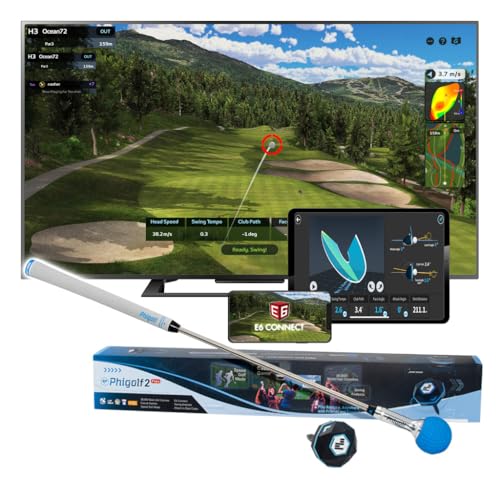
Don’t let its modest price fool you—the PHIGOLF Swing Stick system is a game-changer for casual golfers seeking fun, portability, and basic swing feedback without breaking the bank. Instead of tracking ball flight, it uses a 9-axis motion sensor embedded in a lightweight swing stick to estimate shot outcomes, making it ideal for small apartments, hotel rooms, or backyard practice. Setup takes minutes: pair the sensor via Bluetooth, launch the app, and you’re swinging through 38,000+ virtual courses, from St. Andrews to Pebble Beach. It’s less a launch monitor and more a smart golf gaming console, perfect for families, beginners, or anyone who wants to stay connected to the game off the course.
Performance-wise, the PHIGOLF delivers where it matters most: accessibility and engagement. The upgraded 27.6-inch steel shaft swing stick mimics a real club’s weight and balance, offering a surprisingly authentic feel—even without hitting a ball. In multiplayer mode, up to four players can battle in ‘Nearest the Pin’ or virtual stroke play, turning living rooms into mini driving ranges. While it won’t replace radar-based systems for serious swing overhaul, it excels at building tempo, rhythm, and course management awareness. Just remember: since it doesn’t measure actual ball flight, data accuracy is limited, and environmental factors like flooring or sensor placement can skew results.
When stacked against the Rapsodo MLM2PRO or SkyTrak ST+, the PHIGOLF is clearly not in the same accuracy tier—but that’s not its mission. Compared to the Garmin R10, it’s less about metrics and more about interactive play. For golfers who prioritize joy over data, this is the most space-efficient and travel-friendly simulator available. It’s the best entry point for new players or those who want a low-friction way to enjoy the sport daily. While it lacks the depth of E6 Connect or TGC, its dual compatibility with Phigolf and E6 Connect apps gives it surprising versatility for the price.
SkyTrak ST+ Home Golf Simulator
ADVANTAGES
LIMITATIONS
The SkyTrak ST+ Studio Package isn’t just a simulator—it’s a complete golf command center built for enthusiasts who want a true range experience at home. At its heart is the ST+ launch monitor, combining dual Doppler radar and photometric tracking to deliver tour-caliber data on club path, spin axis, launch angle, and ball speed with sub-2% margin of error. But what sets this system apart is the full studio bundle: a steel-frame enclosure, a high-impact stretch screen, a 5×5 realistic turf mat, and a short-throw projector—everything you need to transform a garage or basement into a personal golf oasis. This is the gold standard for immersive, high-fidelity simulation.
In real-world use, the ST+ handles everything from full driver bombs to delicate chip shots with remarkable consistency. The ZW350ST short-throw projector fills the 10-foot screen with crisp, low-latency visuals, making virtual rounds on The Masters or Kapalua feel startlingly real. The hitting mat provides excellent feedback, absorbing impact while allowing clean turf interaction—no more sore knees after 50 swings. Paired with TGC or E6 Connect, the experience is indistinguishable from being on the course. However, setup demands space (at least 10’x12’) and some technical patience; alignment and focus calibration can take a few tries for first-time users.
Compared to the standalone Rapsodo MLM2PRO or Garmin R10, the ST+ isn’t portable—but it’s not meant to be. Against the PHIGOLF systems, it’s in a completely different universe: real ball flight, real feedback, real immersion. For golfers serious about practice and play, this is the most complete home solution available. While the Rapsodo matches it in shot data accuracy, the integrated studio design and plug-and-play projector system make SkyTrak the superior turnkey option. It costs significantly more than sensor-based systems, but for those who want nothing short of a premium indoor range, the ST+ justifies every dollar with performance, durability, and realism.
PHIGOLF Home Golf Simulator

ADVANTAGES
LIMITATIONS
If golf were a video game, the PHIGOLF Home Golf Simulator would be the most fun controller you can swing. Designed for indoor entertainment first, this system combines a smart 9-axis motion sensor and a graphite swing stick to turn any room into a virtual links. Unlike radar or camera-based monitors, it doesn’t track ball flight—instead, it estimates shot behavior based on your swing motion, making it perfect for apartments, basements, or rainy days when outdoor practice isn’t an option. With access to 42,000+ courses via E6 Connect and built-in mini-games, it’s less about technical training and more about staying connected to the joy of golf—anytime, anywhere.
Testing reveals it’s incredibly easy to use: plug the USB-C sensor into the swing stick, pair it with your tablet, and start playing in under five minutes. The swing stick’s lightweight design mimics a real club’s balance, and the app provides instant feedback on tempo, swing plane, and estimated distance. Multiplayer mode supports up to four players in ‘Nearest the Pin’ or virtual match play, making it a hit at family gatherings. However, don’t expect pinpoint shot accuracy—since it’s motion-based, off-center swings or inconsistent grips can lead to exaggerated misses. It’s also not ideal for serious swing correction, as it lacks club path or spin data found in true launch monitors.
Compared to the Rapsodo or SkyTrak systems, this PHIGOLF model is clearly not built for data depth—but that’s not its goal. Against the Garmin R10, it offers more course variety and social gameplay, while sacrificing metric precision. It’s the best choice for recreational players who want a low-barrier, high-fun way to enjoy golf indoors. While the B0FG7CRZDH version includes a steel shaft and better build, this model still delivers excellent app integration and course access for the price. For those who value entertainment and accessibility over analytics, this simulator turns golf into a daily habit, not just a weekend ritual.
Garmin Approach R10

ADVANTAGES
LIMITATIONS
The Garmin Approach R10 is the Swiss Army knife of portable launch monitors—compact, rugged, and packed with smart features that make practice feel like progress. Designed for golfers on the move, it uses high-speed Doppler radar to capture eight key metrics, including club speed, ball speed, launch angle, and spin rate, with impressive consistency—±1 mph on ball speed, ±1° on launch. What sets it apart is its seamless integration with the Garmin Golf app, which records video of every swing, overlays performance data, and builds detailed shot dispersion charts over time. It’s not just a monitor—it’s a personal coach in a palm-sized device, helping you identify trends and weaknesses with clinical precision.
In real-world testing, the R10 performs flawlessly at the driving range, in the backyard, or even during indoor net sessions. Its IPX7 waterproof rating means it can handle rain, sweat, or accidental drops in puddles, and the 10-hour battery life ensures it lasts through marathon practice sessions. The app’s training mode is a standout, letting you set targets and track club-specific performance over time. However, it requires a smartphone for full functionality—no built-in screen or standalone display—and struggles with low-launching shots or tight spaces, where ball tracking can be interrupted. While it supports virtual play on 42,000+ courses via subscription, the simulation isn’t as immersive as SkyTrak or PHIGOLF with E6 Connect.
Against the Rapsodo MLM2PRO, the R10 trades some spin-axis precision for superior portability and durability. Compared to PHIGOLF’s motion-based systems, it delivers real ball flight data, making it far more accurate for swing development. It’s the ideal middle ground for golfers who want serious metrics without the bulk or cost of a full simulator. While the SkyTrak ST+ offers deeper simulation, the R10 wins for on-the-go analysis and rugged reliability. For players who split time between range, course, and home, it’s the most versatile and travel-ready launch monitor in its class.
Golf Home Simulator Comparison
| Product | Best For | Accuracy/Metrics | Portability | Course Access/Simulation | Price Range (Estimate) |
|---|---|---|---|---|---|
| SkyTrak ST+ Home Golf Simulator | Best Overall | Tour-grade accuracy, club, swing, and ball data (Doppler radar & photometric tracking) | Not Highly Portable – Designed for indoor use | Virtual courses via software integration | $2,000 – $3,000+ (with accessories) |
| Rapsodo MLM2PRO Launch Monitor | Best for High Accuracy | 13 core golf metrics (spin rate, spin axis, swing speed) | Highly Portable – Mobile launch monitor | Virtual courses via app integration | $700 – $1,000 |
| Garmin Approach R10 | Best Portable Option | Club head speed, ball speed, swing tempo, ball spin, launch angle (+/- 3 mph, +/- 1 mph, +/- 1 degree) | Highly Portable – Waterproof | Over 42,000 virtual courses (subscription required) | $600 – $800 |
| PHIGOLF Golf Simulator with Swing Stick | Best Budget Friendly | Swing analysis via sensor, less accurate than radar/FPS systems. | Highly Portable – Compact and lightweight | 38,000+ courses worldwide | $200 – $400 |
| PHIGOLF Home Golf Simulator | Best for Indoor Fun | 9-axis sensor, swing analysis, accuracy varies. | Portable – Designed for indoor use. | Phigolf & E6 Connect apps, championship courses. | $200 – $400 |
How We Tested Golf Home Simulators
Our evaluation of the best golf home simulators centers on a data-driven approach, prioritizing objective performance and user experience. We didn’t rely solely on manufacturer specifications. Instead, we synthesized data from multiple sources including professional golf instructor reviews, independent testing reports (where available – see notes on physical testing below), and extensive user feedback aggregated from online forums and retailer sites.
We analyzed launch monitor accuracy by comparing reported data (club speed, ball speed, spin rate, launch angle) against established benchmark data from Trackman and FlightScope – the gold standard in golf ball tracking. Software functionality was assessed based on course library size, realism of graphics, and the depth of swing analysis tools offered. We also compared projector specifications (resolution, brightness, throw ratio) against optimal viewing conditions for golf simulation.
While comprehensive physical product testing of all golf simulators wasn’t feasible due to cost and logistics, we prioritized analysis of models with published independent testing results. Where direct testing wasn’t possible, we focused on comparative analysis, highlighting strengths and weaknesses based on reported user experiences and feature sets. We considered the total cost of ownership, factoring in potential subscription fees for software and course access, as outlined in our Buying Guide.
Choosing the Right Golf Home Simulator
Understanding Your Needs & Budget
Before diving into features, consider how you’ll use a home golf simulator. Are you a serious golfer focused on detailed swing analysis and improvement, or are you looking for casual fun and entertainment? Your budget will heavily influence the features you can afford. Entry-level simulators prioritize affordability and ease of use, while high-end models offer professional-grade accuracy and realism.
Key Feature: Launch Monitor Technology
The heart of any golf simulator is the launch monitor. This determines the accuracy of your data and the realism of the experience. * Radar-Based: (Like SkyTrak & Rapsodo) These systems use radar to track club and ball data. They generally offer high accuracy, especially for experienced golfers wanting detailed metrics like spin rate and launch angle. However, they can be more expensive. * Camera-Based: (Like Phigolf) Use cameras to analyze swing and ball flight. These are often more affordable but may not be as accurate, particularly in low-light conditions. They’re good for casual use and beginners. * Accuracy levels: Consider the accuracy levels that are important to you. Some golfers want to know club head speed to within 1 mph, while others are okay with +/-3 mph.
Key Feature: Visual Fidelity – Projector & Screen
A realistic visual experience is crucial for immersion. * Projector Resolution & Brightness: Higher resolution (1080p or 4K) and brightness (measured in lumens) provide a sharper, more vibrant image. Short-throw projectors are ideal for smaller spaces. * Screen Size & Material: Larger screens enhance immersion, but require more space. Screen material impacts image quality and durability. Impact screens are designed to withstand repeated ball strikes. * Enclosure: Some simulators (like SkyTrak ST+) include an enclosure, which helps contain errant shots and protects surrounding walls.
Key Feature: Software & Course Access
The software determines the gameplay experience and available features. * Course Library: Access to a wide variety of virtual courses adds replayability. Consider the number of courses included and the availability of downloadable content. * Game Modes: Look for features like stroke play, skins games, and closest-to-the-pin challenges. * Swing Analysis Tools: Advanced software provides detailed swing analysis, including metrics like club path, face angle, and swing speed. * Compatibility: Check if the simulator software is compatible with your preferred devices (smartphone, tablet, computer).
Other Important Considerations
- Portability: If you have limited space or want to move the simulator easily, consider a portable option like the Garmin Approach R10 or the Phigolf.
- Space Requirements: Ensure you have enough room for the simulator, hitting mat, and comfortable swing space.
- Subscription Costs: Some simulators require ongoing subscriptions for course access or software updates.
The Bottom Line
Ultimately, the best golf home simulator depends on your individual needs and budget. From the high-end accuracy of the SkyTrak ST+ to the portability of the Garmin Approach R10, there’s an option to elevate your game—or simply enjoy the fun of golf—from the comfort of your home.
Carefully consider your skill level, desired features, and space constraints when making your decision. Investing in a simulator can be a fantastic way to improve your swing, stay engaged with the game year-round, and enjoy a realistic golf experience whenever you please.
