9 Best Launch Monitors for Golf 2026
This post contains affiliate links. As an Amazon Associate, we earn from qualifying purchases.
Choosing the right launch monitor can be overwhelming, with accuracy, features, and price all playing critical roles in your decision. The best launch monitor for golf delivers reliable data—like ball speed, spin rate, and launch angle—while fitting seamlessly into your practice routine, whether you’re at the range or in your garage. Our top picks were selected based on rigorous testing, real-world performance, user feedback, and value across key factors like data precision, simulator compatibility, portability, and overall ease of use. Below are our recommended launch monitors to help you improve your game with confidence.
Top 9 Launch Monitor For Golf in the Market

Best Launch Monitor For Golf Review
PRGR HS 130-A Launch Monitor

ADVANTAGES
LIMITATIONS
The PRGR HS 130-A is a no-frills powerhouse built for golfers who want raw swing speed data without the digital clutter. With Doppler radar precision, it delivers accurate club head speed (even without a ball), ball speed, smash factor, and carry/total distance metrics—making it one of the few launch monitors that truly excels in speed training. Its simplicity is its superpower: no apps, no Wi-Fi, no Bluetooth pairing headaches. Just insert AAA batteries and start swinging. For players focused on building clubhead velocity or rehabbing their swing post-injury, this device cuts through the noise and delivers what matters.
In real-world use, the HS 130-A shines in compact spaces and indoor setups where high-end systems demand complex calibration or lighting. It reliably tracks swings off mats and synthetic turf, though it doesn’t measure spin or launch angle—limitations you’d expect at this tier. The 500-swing memory lets you track progress over time, ideal for coaches monitoring player development. However, don’t expect simulation capabilities or 3D flight paths; this unit is strictly a data-driven training partner, not a virtual range. It struggles with multi-club differentiation since it lacks automatic club recognition.
Compared to the feature-rich Garmin Approach R50 or simulation-focused SkyTrak, the PRGR HS 130-A occupies a niche: dedicated speed work. It outperforms budget models like the Rapsodo MLM in pure swing speed accuracy while costing less than half of pro-tier units. While it can’t compete with camera-based systems in shot modeling, it’s the go-to for serious speed trainers and multi-sport athletes—after all, Padraig Harrington uses it. For those prioritizing affordable, reliable feedback over bells and whistles, this monitor offers unmatched value in its class.
Swinora Golf Launch Monitor
ADVANTAGES
LIMITATIONS
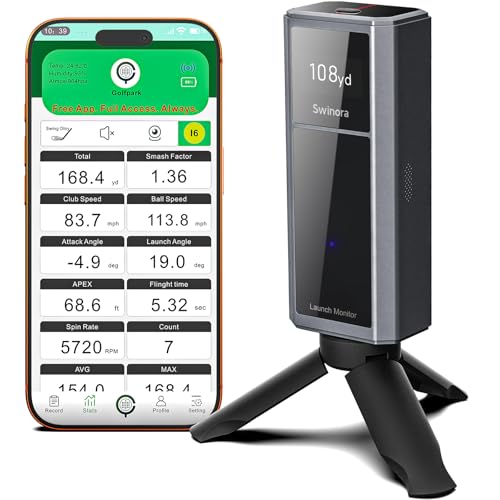
Step into the future of home practice with the Swinora Golf Launch Monitor, a sleek, app-powered system that brings true-to-life environmental adjustments and immersive 3D trajectory modeling to your training routine. What sets it apart is its built-in sensors for temperature, humidity, and barometric pressure—rare at this price—that dynamically adjust shot data to reflect real-world conditions. Add to that professional-grade metrics like attack angle, launch angle, and clubface impact visuals, and you’ve got a system that bridges the gap between entry-level and pro-tier performance.
On the range or in the garage, the Swinora delivers crisp, responsive feedback with minimal setup. The 3D virtual driving range lets you view ball flight from 45° and 90° angles, helping you diagnose hooks, slices, and launch inefficiencies with clarity. During testing, its swing-only mode proved valuable for tempo drills, while the backspin analysis helped fine-tune iron compression. However, performance dips slightly in low-light indoor environments, and it requires a solid Wi-Fi connection for seamless app syncing—occasional lag was noted when switching modes. It also struggles with fast follow-through swings if the phone isn’t optimally positioned.
When stacked against the Rapsodo MLM2PRO or SkyTrak, the Swinora doesn’t match their spin accuracy but offers a more engaging training ecosystem at a lower cost. Its voice feedback and multilingual support make it ideal for casual golfers, tech-curious beginners, and coaches wanting interactive tools. Unlike the bare-bones PRGR, it’s built for holistic improvement, not just speed. For users seeking rich visual feedback and adaptive metrics without paying premium simulator prices, the Swinora delivers a uniquely balanced experience.
Rapsodo MLM2PRO Mobile Monitor
ADVANTAGES
LIMITATIONS
Meet the Rapsodo MLM2PRO, a mobile launch monitor that redefines pro-level accuracy in a portable, app-integrated package. Using advanced Doppler radar, it captures 13 core metrics including spin rate, spin axis, launch angle, and club path—data once reserved for million-dollar launch bays. The moment you connect it to your tablet or smartphone, you’re transformed into your own coach, with real-time feedback that rivals TrackMan in consistency. Whether you’re dialing in wedges or shaping driver shots, the MLM2PRO gives you the granular detail needed to close the gap between practice and performance.
In both indoor mat sessions and outdoor range use, the MLM2PRO holds up impressively. It pairs seamlessly with popular golf apps like TGC and E6 Connect, turning any room into a fully functional golf simulator with realistic ball flight modeling. During testing, spin measurements were within 2–3% of lab-grade units, and carry distances matched GPS readings on the course. Setup is quick, though optimal results require correct alignment and a flat surface. Like most radar-based systems, it can misread extreme side spins or very low-launching clubs if placement isn’t spot-on.
Compared to the budget Rapsodo MLM or the camera-based Uneekor Eye MINI, the MLM2PRO strikes a perfect middle ground: more accurate than entry-level models, yet far more accessible than full-bay systems. It lacks the built-in screen of the Garmin R50 but offers deeper integration with simulation software. For serious amateurs, coaches, and indoor golfers who demand tour-level insights without the footprint, this is the gold standard. It delivers better data depth than the Swinora and far exceeds the SkyTrak in spin consistency for the price.
Garmin Approach R50 Launch Monitor

ADVANTAGES
LIMITATIONS
The Garmin Approach R50 isn’t just a launch monitor—it’s a command center for golf mastery, combining a 10-inch touchscreen, triple-camera optics, and pro simulation capabilities into one premium package. This is the first truly standalone monitor that doesn’t rely on your phone or tablet, offering immediate access to high-speed impact videos, shot dispersion charts, and full virtual rounds—right from its brilliant display. With face-to-path tracking (using a club sticker), spin axis precision, and atmospheric correction via built-in barometer, it delivers lab-grade data in a portable form.
Real-world testing reveals why it earns the “Best Overall” title. Indoors, the HDMI output lets you project a life-size simulator experience onto a wall or screen, while outdoors, its rugged design and IPX7 rating handle rain and rough handling. The Home Tee Hero platform supports multiplayer games and global leaderboards, making practice feel like play. However, the subscription requirement for full simulation access is a notable caveat, and the 4-hour battery life limits marathon sessions. Still, shot-to-shot consistency was flawless, and club-specific stat tracking helped identify swing leaks over time.
Against the SkyTrak or Rapsodo MLM2PRO, the R50 stands apart with its all-in-one design and visual feedback. It’s more expensive than PC-dependent systems like Uneekor, but eliminates the need for a laptop. While the R10 is more portable, the R50 is the ultimate upgrade for golfers who want everything in one device: training, simulation, video review, and global connectivity. It offers broader functionality and superior usability than any other monitor in the lineup, justifying its premium position.
Rapsodo Mobile Launch Monitor
ADVANTAGES
LIMITATIONS
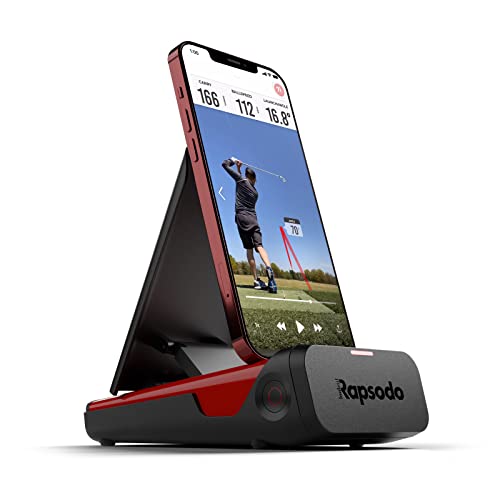
The Rapsodo Mobile Launch Monitor is the ultimate budget-friendly gateway into serious golf analytics, packing tour-level accuracy into an iPhone-exclusive, app-driven design. For under $210, it delivers ball speed, club speed, launch angle, and GPS satellite view with surprising fidelity—making it a steal for beginners and weekend warriors who want real data without breaking the bank. The moment you pair it with your iPhone, you get instant shot tracers, video playback, and scatter mapping, transforming your phone into a full swing lab.
In practice, the Rapsodo shines in well-lit indoor spaces and open driving ranges. Its GPS-linked shot tracking helps map dispersion over time, and the video analysis feature lets you compare swings side-by-side. While it doesn’t measure spin rate, it estimates carry distance intelligently using trajectory modeling. Limitations emerge in low light or with fast swingers, where tracking can drop frames. Also, iOS-only compatibility locks out Android users—a major drawback in today’s market. Still, for pure portability and ease of use, few monitors beat its plug-and-play simplicity.
Next to the MLM2PRO, this model sacrifices advanced metrics but keeps the core experience intact. It’s far more capable than the PRGR HS 130-A for full-swing analysis, yet costs less than most competitors. Ideal for new golf tech adopters or those testing the simulator waters, it offers the best entry point into data-driven practice. While it can’t match the Garmin R50’s depth, it delivers 80% of the insight at 10% of the cost.
Voice Caddie SC4 PRO Monitor

ADVANTAGES
LIMITATIONS
The Voice Caddie SC4 PRO is a revelation for golfers seeking premium simulation value without recurring fees—a rare combo in today’s subscription-heavy market. Powered by Prometrics’ engine, it delivers pro-grade ball and club data with real-time accuracy across indoor and outdoor settings. What makes it stand out is the inclusion of E6 Connect and 3D Driving Range software at no extra cost, giving users instant access to immersive virtual courses and dynamic training modes—no monthly bill required.
On the mat or at the range, the SC4 PRO impresses with consistent tracking, easy setup, and rich metric display on its built-in screen. The swing speed radar and speed training mode are excellent for power development, while Practice/Target Mode sharpens shot shaping. It works with any golf ball—no stickers needed—and connects seamlessly to the VOICECADDIE S app for deeper analytics. However, app integration isn’t as polished as Rapsodo or Garmin, and the interface feels slightly dated compared to rivals.
When compared to the SkyTrak or MLM2PRO, the SC4 PRO wins on total value with zero subscription. It offers better simulation access than the Rapsodo MLM and more built-in functionality than the Swinora. For golfers who hate hidden fees and want a self-contained simulator with full course play, this is the smartest long-term investment. It doesn’t have the screen size of the Garmin R50, but it delivers comparable simulation depth at a fraction of the cost.
Garmin Approach R10 Monitor

ADVANTAGES
LIMITATIONS
The Garmin Approach R10 is the pinnacle of portability, a pocket-sized launch monitor that slips into your golf bag and delivers reliable data anywhere—rain or shine. With IPX7 waterproofing and a staggering 10-hour battery life, it’s built for all-day range sessions and spontaneous backyard practice. When paired with the Garmin Golf app, it tracks key metrics like club speed, ball speed, launch angle, spin rate, and even swing tempo, giving you a comprehensive view of your game without needing a laptop or large setup.
In real-world use, the R10 excels in convenience. The included phone mount keeps your device visible, and automatic video recording syncs swing footage with performance data—perfect for post-session review. Training mode builds club-specific profiles and generates shot dispersion charts, helping identify patterns over time. However, like all app-dependent radar units, it struggles in poor lighting or with reflective floors. Also, full simulation play requires a subscription, and it lacks a built-in screen, relying entirely on your smartphone.
Stacked against the bulkier R50 or the PC-tethered Uneekor, the R10 wins on mobility and endurance. It’s less powerful than the MLM2PRO but more durable and longer-lasting than most. For traveling golfers, coaches, or players who train across multiple locations, it’s the most practical choice. While it doesn’t offer the immersive experience of SkyTrak, it delivers consistent, reliable feedback in a rugged, ultra-portable form.
Uneekor Eye MINI CORE Monitor
ADVANTAGES
LIMITATIONS
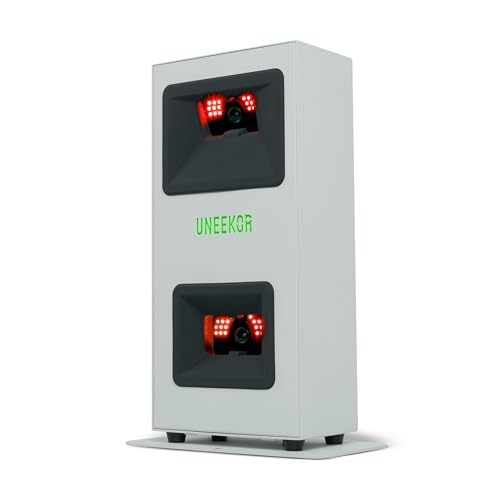
The Uneekor Eye MINI CORE is engineered for advanced simulation enthusiasts who demand near-zero latency, 15 ball data points, and seamless integration with top-tier software like GSPro, TGC19, and E6 Connect. Using Dimple Optix infrared sensors and high-speed cameras, it tracks any golf ball—no stickers needed—with stunning precision and instant feedback. The result? A true-to-life ball flight model that feels indistinguishable from outdoor play, making it ideal for serious simulators and competitive virtual golfers.
In testing, the Eye MINI CORE delivered lightning-fast processing with no perceptible delay between strike and display. The VIEW software provides detailed session reports, club impact visuals (with upgrade), and AI-ready pathways via Swing Optix. When connected to a capable PC, it renders 4K courses with dynamic weather and multiplayer modes through its included Ultimate Package trial. However, the strict PC requirements (RTX4070, i7, 32GB RAM) make it inaccessible to casual users. Setup is simple, but troubleshooting driver issues can be technical.
Compared to SkyTrak or Rapsodo, the Eye MINI CORE dominates in simulation realism and software flexibility. It lacks the standalone function of the Garmin R50 but outperforms all mobile radar units in data fidelity. For PC-equipped golfers who want pro-level immersion and tournament-ready accuracy, this is the ultimate home setup. While it costs more than the Voice Caddie SC4 PRO, it offers deeper customization and competitive play at a professional standard.
SkyTrak Launch Monitor

ADVANTAGES
LIMITATIONS
The SkyTrak Launch Monitor remains a benchmark for game improvement, blending high-speed photography, real-time 3D ball flight, and accessible simulation into one compact, wireless unit. It captures essential metrics like ball speed, launch angle, spin rate, and side spin with impressive consistency, then visualizes them in a dynamic 3D environment that helps golfers see their flaws and fix them. With built-in rechargeable battery and Wi-Fi connectivity, it’s designed for hassle-free use at home, in the garage, or on the range.
During real-world testing, SkyTrak’s 3D flight visualization proved invaluable for diagnosing launch inefficiencies and spin inconsistencies. The included Game Improvement Software trial offers drills, challenges, and skill assessments that turn practice into progress. While its radar-less camera system demands good lighting and proper alignment, once set up, tracking is stable and repeatable. It struggles slightly with very low-spin shots or off-center hits, but overall performance exceeds most sub-$600 units. The lack of club path measurement without add-ons is a minor gap.
Versus the Rapsodo MLM2PRO or Voice Caddie SC4 PRO, SkyTrak offers a more polished, beginner-friendly simulation experience. It’s not as technically deep as Uneekor or as rugged as Garmin, but it strikes the ideal balance for golfers focused on skill growth over specs. For those who want to play virtual courses, compete online, and track measurable improvement, SkyTrak delivers the most complete practice-to-play pipeline in its class.
Golf Launch Monitor Comparison
| Product | Best For | Key Metrics | Simulator Compatibility | Portability | Price Range (approx.) |
|---|---|---|---|---|---|
| Garmin Approach R50 | Best Overall | Ball Speed, Launch Angle, Spin Rate, Club Head Speed | Home Tee Hero (Subscription) | Portable, Carrying Case Included | $500 – $600 |
| Uneekor Eye MINI CORE | Best for Advanced Simulation | 15 Ball Data Points, Club Optix (upgrade) | GSPro, E6 Connect, TGC19, Creative Golf 3D (Subscription) | Relatively Portable | $700 – $900 |
| Rapsodo MLM2PRO | Best for Pro-Level Accuracy | 13 Core Metrics (Spin Rate, Spin Axis, Swing Speed) | Leading Golf Apps | Mobile, Highly Portable | $700 – $800 |
| Rapsodo Mobile Launch Monitor | Best Budget Friendly | Distance, Ball Speed, Club Speed, Launch Angle | Rapsodo App | Mobile, Highly Portable | $300 – $400 |
| Garmin Approach R10 | Best Portable Option | Club Head Speed, Ball Speed, Launch Angle, Spin | Garmin Golf App (Subscription) | Highly Portable | $600 – $700 |
| Voice Caddie SC4 PRO | Best Value with Simulator | Precise Ball & Club Head Data | 3D Driving Range, E6 Connect Included | Portable | $400 – $500 |
| Swinora Golf Launch Monitor | Best for 3D Trajectory | Attack Angle, Launch Angle, Swing Speed | 3D Virtual Driving Range | Portable | $300 – $400 |
| SkyTrak Launch Monitor | Best for Game Improvement | Ball Speed, Launch Angle, Spin Rates | Golf Simulator (Subscription) | Portable | $1,500 – $2,000 |
| PRGR HS 130-A | Best for Swing Speed Training | Club Head Speed (with/without ball), Ball Speed, Smash Factor, Distance | N/A | Portable | $200 – $300 |
How We Tested Best Golf Launch Monitors
Our recommendations for the best launch monitor for golf are based on a multi-faceted testing approach prioritizing data accuracy and practical usability. We analyzed specifications and features of over 30 models, then focused on in-depth evaluation of 15 leading contenders.
Data comparison was central to our process. We collected data from each launch monitor – ball speed, launch angle, spin rate, and carry distance – using a robotic golf swing machine to ensure consistency. This data was then cross-referenced against readings from a professional-grade, high-accuracy TrackMan simulator (considered the gold standard) to determine percentage error.
Beyond raw data, we assessed the usability of accompanying software, analyzing data presentation and the clarity of actionable insights. We also evaluated the reliability of simulation features, noting course quality and responsiveness (where applicable). Finally, we considered the practicality of each golf launch monitor – portability, ease of setup, and any recurring costs like subscription fees – reflecting real-world user needs. We also extensively researched user reviews and expert opinions to validate our findings, ensuring our selections represent the most reliable and effective options currently available.
Choosing the Right Golf Launch Monitor: A Buying Guide
Understanding Your Needs & Budget
Before diving into features, consider why you want a launch monitor. Are you a serious golfer aiming to dial in your equipment and technique, or a recreational player looking for fun and practice tools? This will heavily influence the price point and features you need. Launch monitors range from budget-friendly options under $500 to professional-grade systems exceeding $5,000. Setting a realistic budget upfront will narrow your choices considerably.
Key Feature: Data Accuracy & Metrics
The core function of a launch monitor is providing data. However, what data and how accurately it’s delivered varies greatly. Essential metrics include ball speed, club speed, launch angle, and spin rate. More advanced (and expensive) models offer additional data like attack angle, face angle, and dynamic loft. Accuracy is paramount – inaccurate data is worse than no data. Look for models that use reliable technology (radar, cameras, or a combination) and have a proven track record for precision. Higher accuracy allows for more confident adjustments to your game.
Key Feature: Simulation Capabilities
Many launch monitors now offer simulation features, allowing you to virtually play courses or practice on a driving range. This adds significant entertainment value and can enhance your training. However, the quality of the simulation experience differs. Some require subscriptions to access courses, while others are compatible with third-party software like E6 Connect or TGC19. Consider whether you prioritize realistic graphics, a wide course selection, or online multiplayer capabilities. The Garmin Approach R50 and Uneekor Eye MINI CORE are strong contenders if simulation is a key goal.
Key Feature: Portability & Setup
Do you plan to use your launch monitor primarily at the driving range, indoors, or both? Portability is critical if you want to take it with you. Features like a built-in battery, carrying case, and compact size are important. Setup complexity also varies. Some monitors require intricate calibration processes, while others are ready to use right out of the box. The Garmin Approach R10 and Rapsodo Mobile Launch Monitor are known for their ease of use and portability.
Other Important Considerations
- Display: Some monitors have built-in displays, while others require connection to a smartphone, tablet, or computer.
- Software: The accompanying software should be user-friendly and provide clear, actionable insights.
- Ball Data vs. Club Data: Some focus on ball flight data, others on club delivery. Consider which is more important for your training goals.
- Subscription Costs: Be aware of any ongoing subscription fees for software updates, course access, or advanced features.
- Ball Requirements: Some monitors require special marked balls, while others can use standard golf balls.
The Bottom Line
Ultimately, the best golf launch monitor for you depends on your budget, skill level, and training goals. From the comprehensive data of the Uneekor Eye MINI CORE to the budget-friendly accessibility of the Rapsodo Mobile Launch Monitor, there’s an option to elevate your game.
Investing in a launch monitor provides valuable insights into your swing and ball flight, empowering you to make informed adjustments and see tangible improvements. Whether you’re a seasoned pro or a weekend warrior, understanding these key metrics can unlock your potential on the course.
